
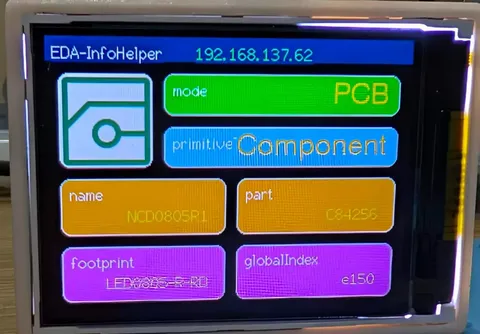
项目文档
项目简介🪄
本项目基于ESP8266开发,借助嘉立创EDA API实现实时将嘉立创EDA信息显示至嵌入式设备上,本项目需要适当的C/C++、Html、CSS、JavaScript/TypeScript、Python语言基础,本项目偏软件及物联网方向。
在本项目中我们需要制作三个产物:
- 硬件设备(C/C++)。
- 中转转发服务上位机(Python)。
- 嘉立创EDA插件(Html、CSS、JavaScript/TypeScript)
项目功能
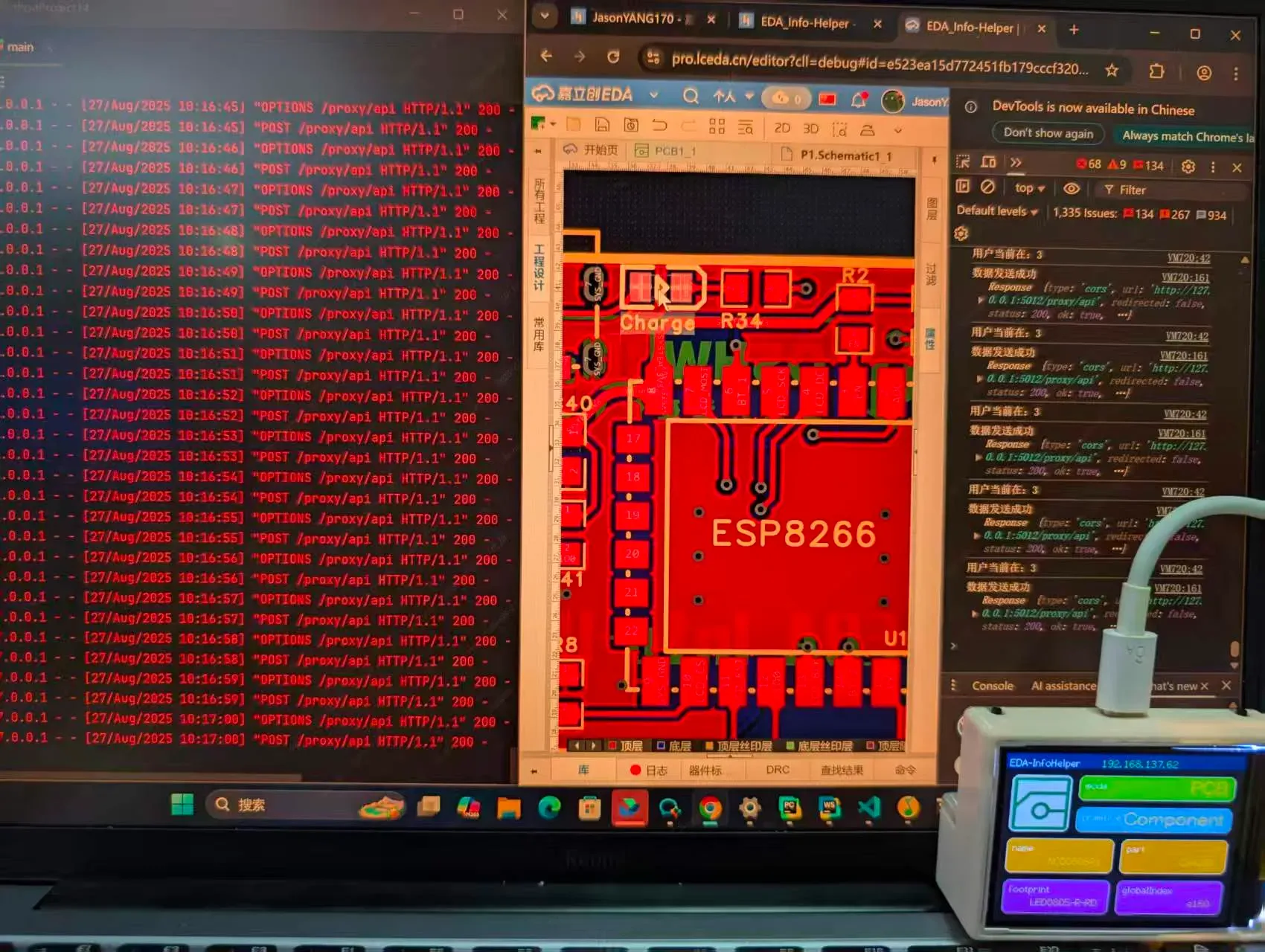
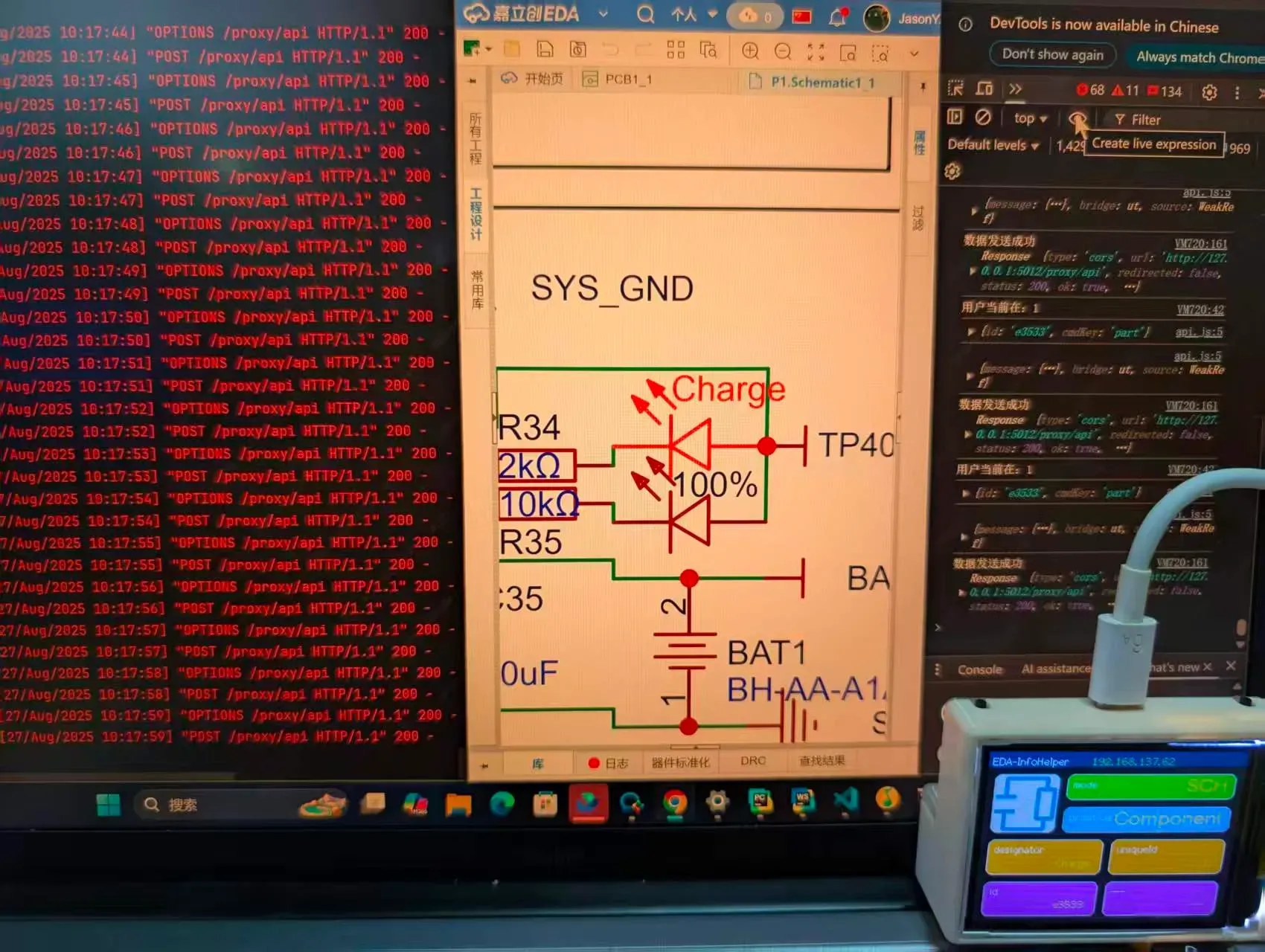
本项目得益于ESP8266的WIFI功能,其实现原理是先通过嘉立创EDA API通过定时器实时监听用户鼠标的点击操作,将点击操作返回的属性信息通过外部请求API发送至本地中转服务,再通过中转服务将数据POST请求至硬件设备IP地址,由ESP8266 WEB服务监听接收POST请求,最后通过显示至屏幕上。
当然,你可能会疑惑为什么不能直接通过外部请求API去POST到硬件设备,这是因为存在安全问题不允许跨IP请求,所以这里只能通过创建一个转发服务来完成跨IP数据转发。
- ✅ WIFI局域网配网
- ✅ 自动记录及联网
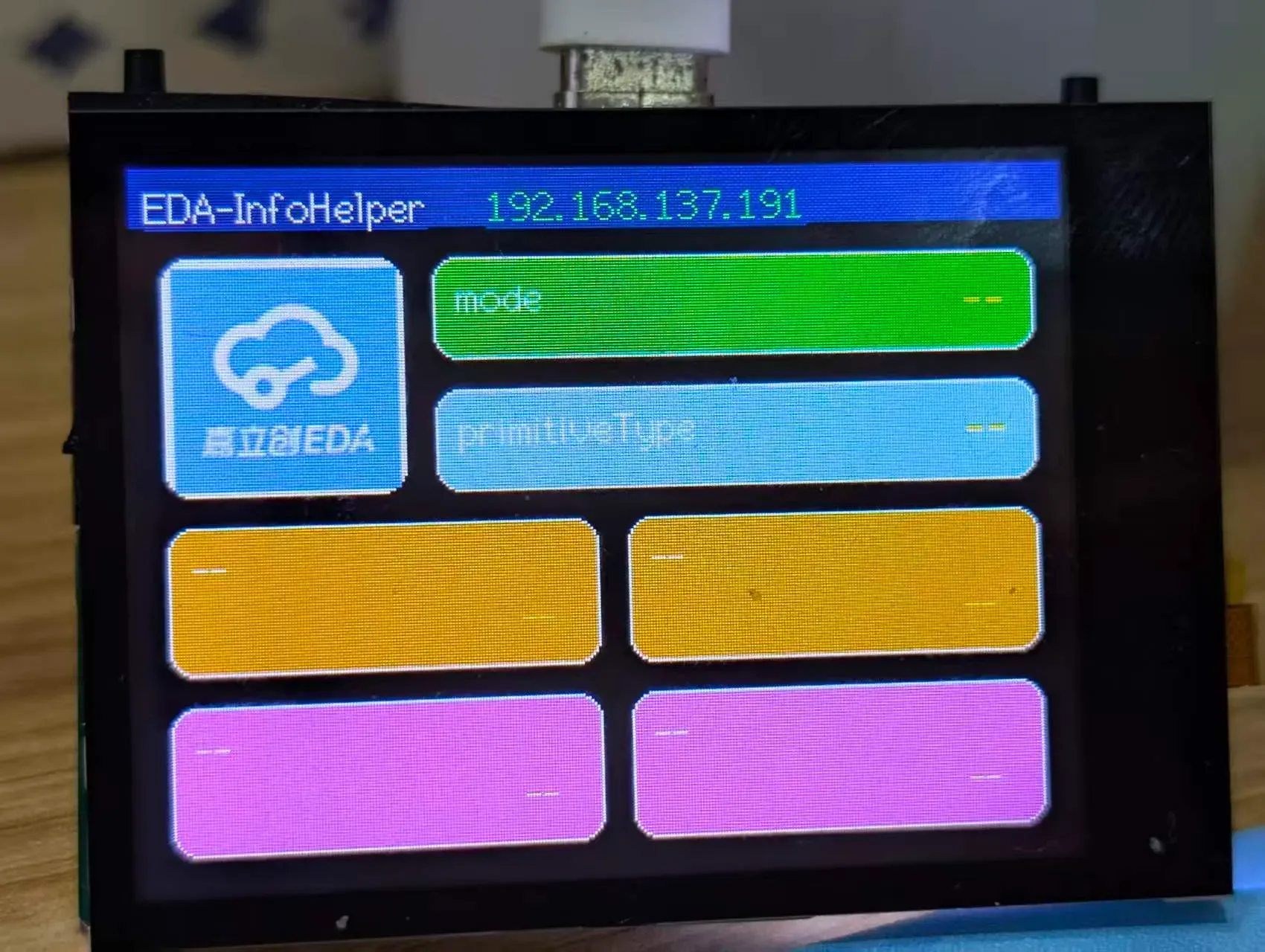
- ✅ 获取数据并显示至屏幕
- ✅ 接收本地5012端口数据,转发至指定IP地址
- ✅ 监听鼠标点击事件,获取属性信息
- ✅ 逻辑处理及信息解析
- ✅ 数据发送至本地5012端口
项目参数🔮
- 采用ESP8266作为主控,ESP8266价格低廉且自带WIFI网络功能
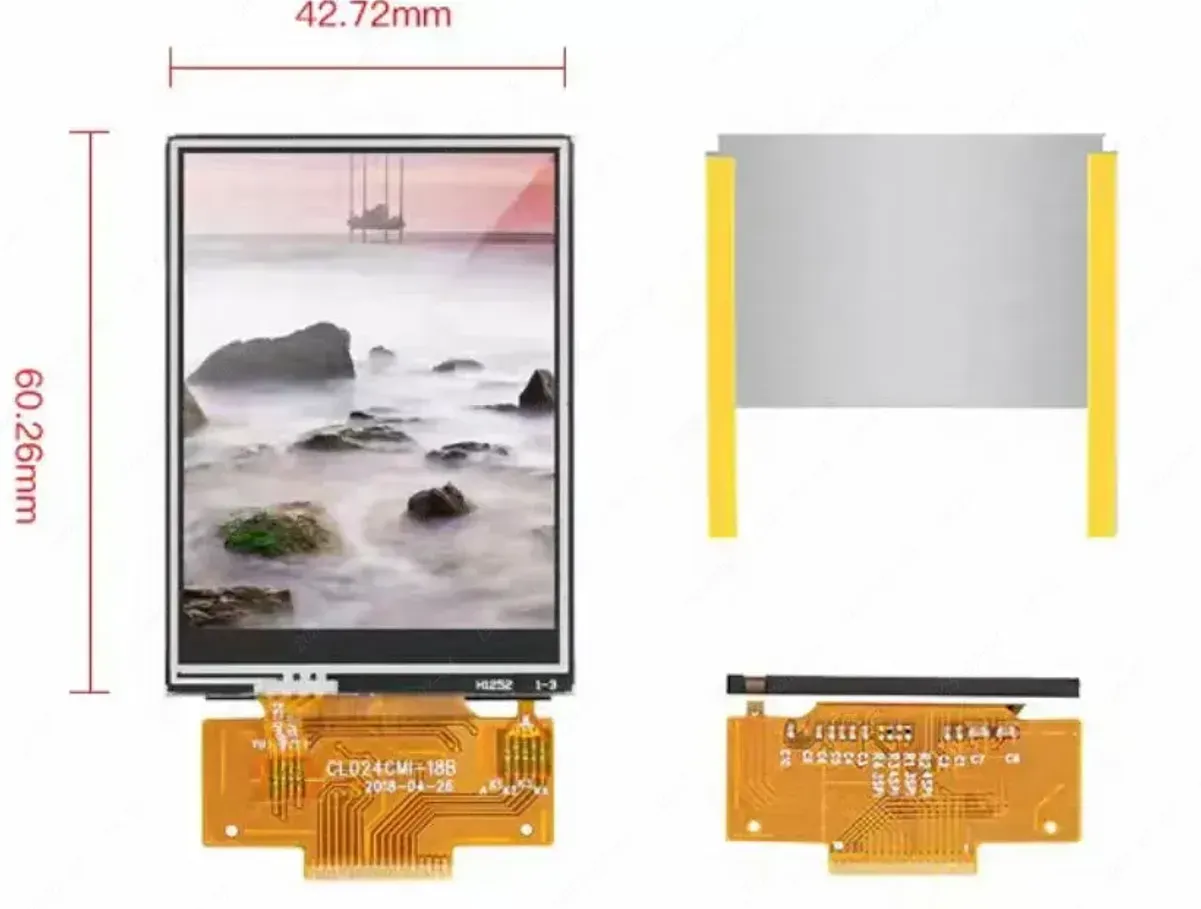
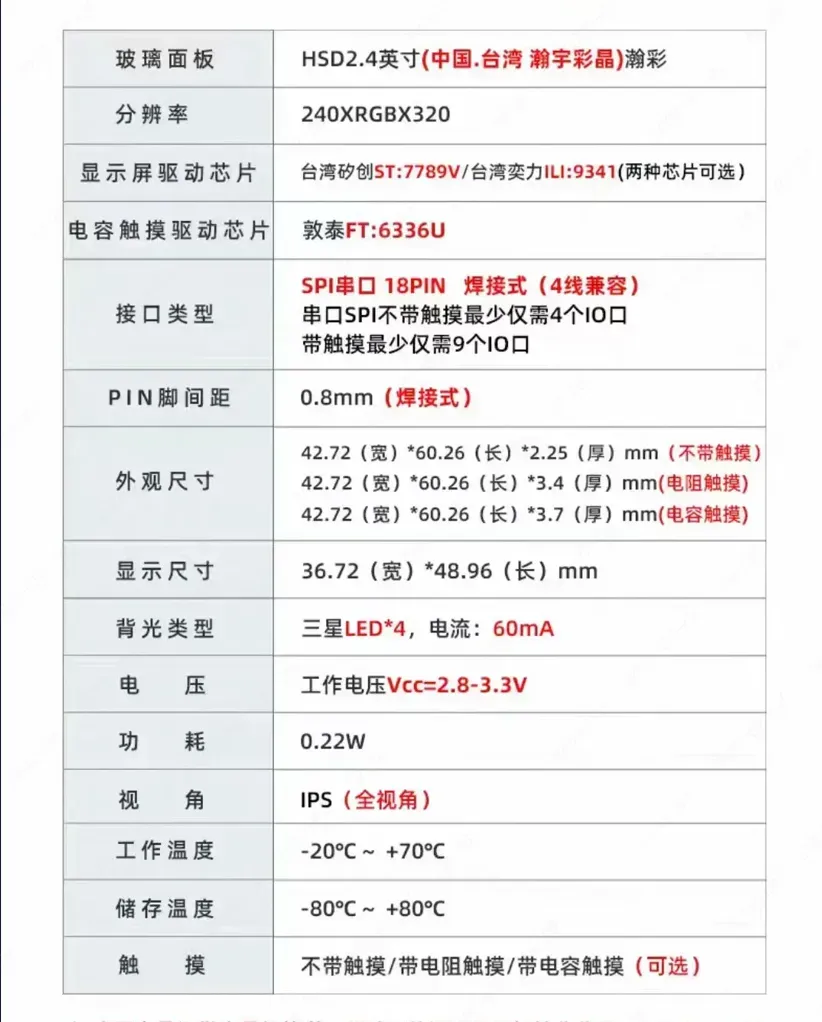
- 屏幕采用ST7789驱动的2.4寸屏幕,240*320分辨率
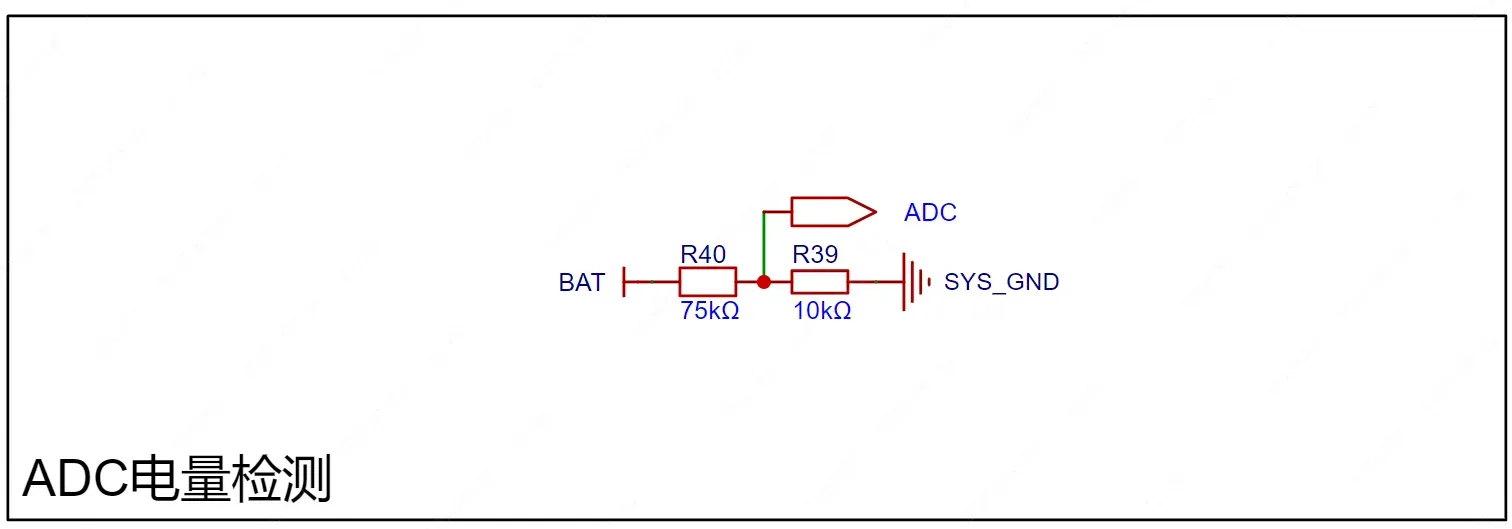
- 电池采用单节14500锂电池,满电电压4.2V
- 充电方案采用TP4056芯片,最大1A充电电流
硬件设计
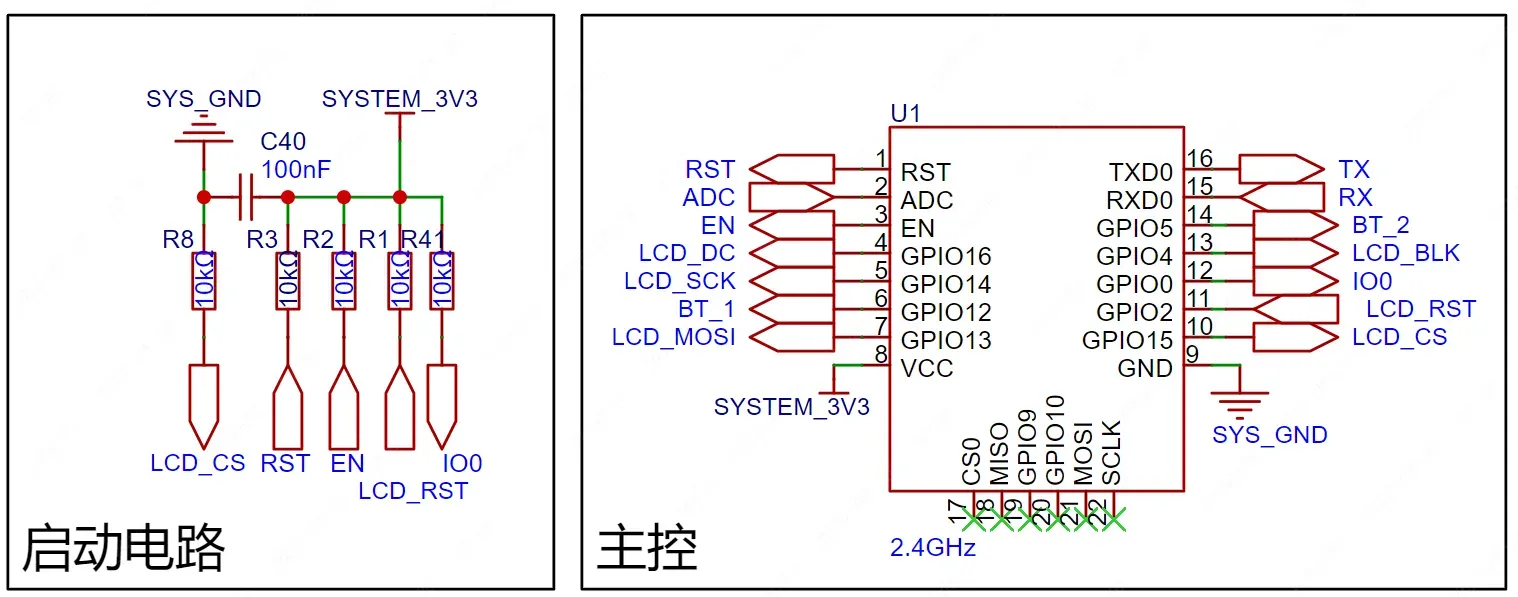
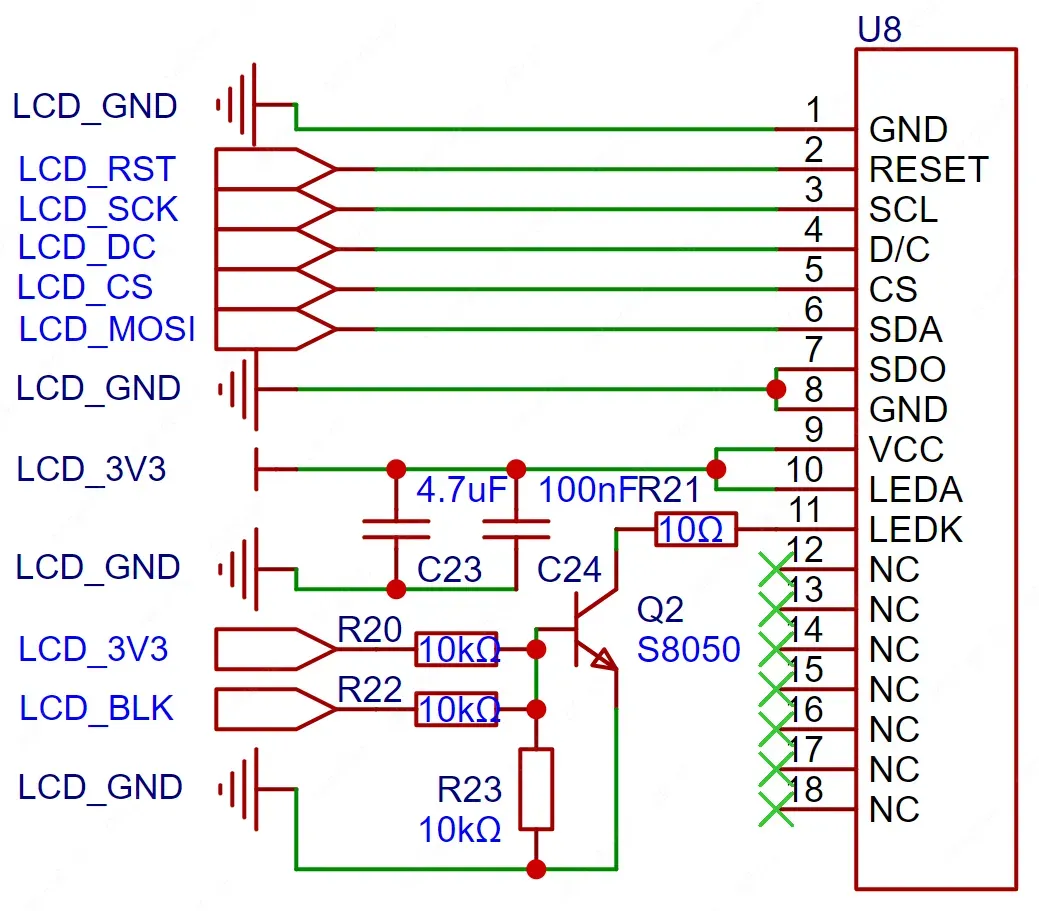
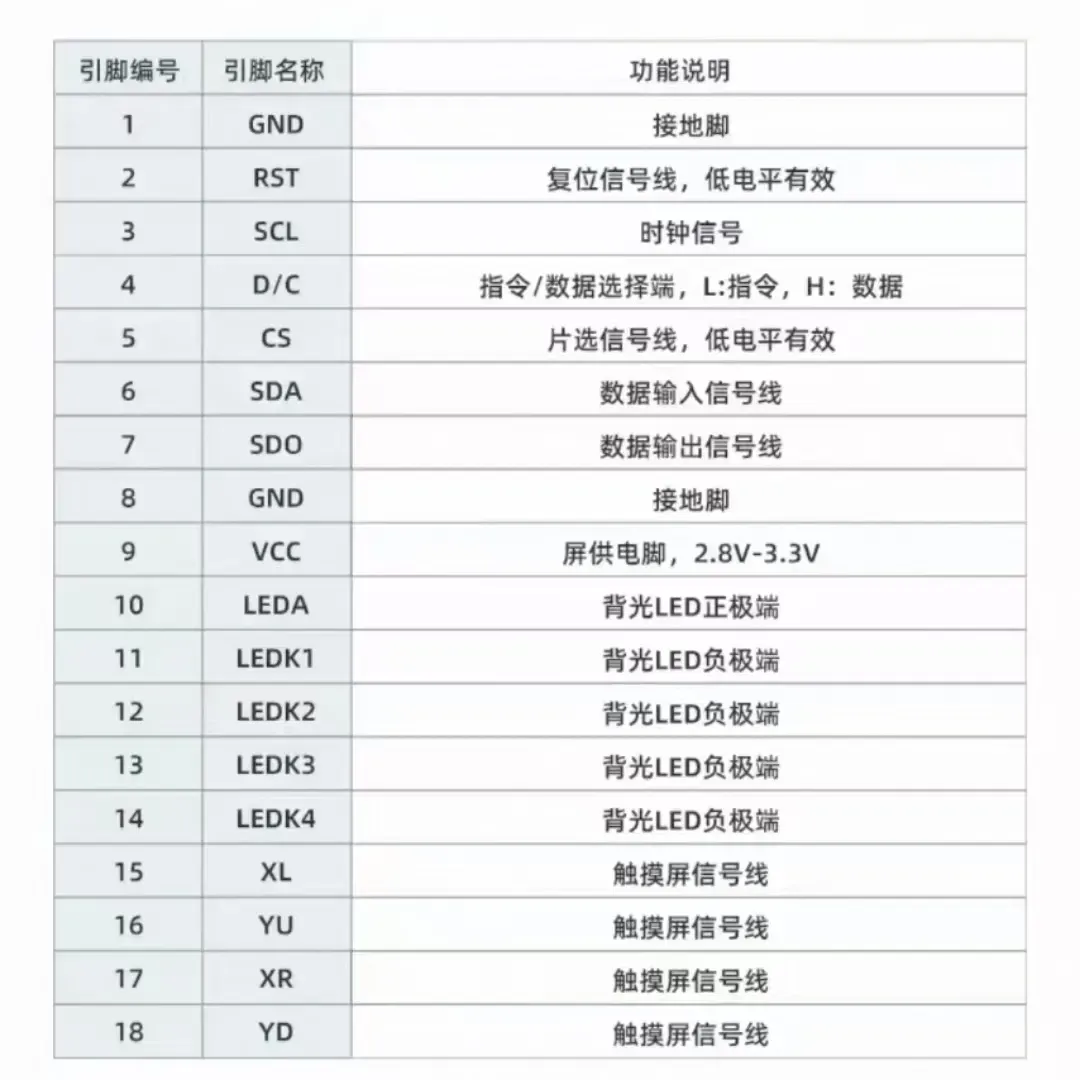
(选用屏幕时切记确保屏幕线序与PCB焊盘线序匹配)
| ST7789屏幕模组模组 | 原理图 |
|---|---|
 |
 |
(本项目未添加触控功能,无需购买带触控面板的屏幕,当然你可以自己拓展触控功能)
| 屏幕信息 | 引脚定义 |
|---|---|
 |
 |
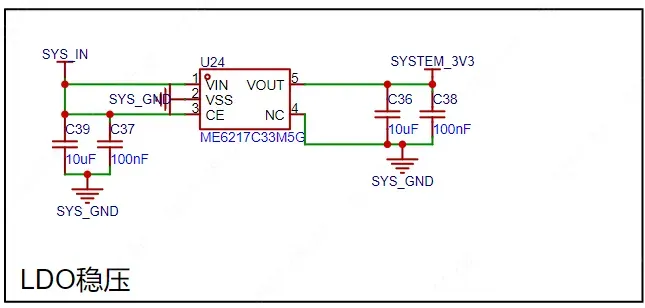
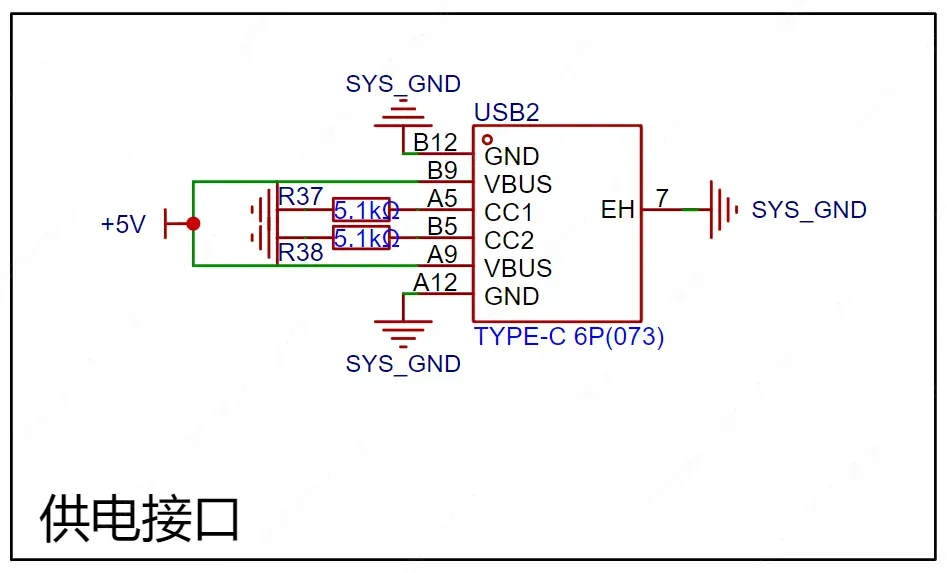
电池供电电路中选用TP4056锂电池充电芯片,电池选用14500单节满电电压4.2V锂电池。项目中通过TYPEC接口的5V进行充电。
(项目电路没有添加保护功能,选用电池时确认电池带保护电路板)
(TP4056选用1A挡位充电时建议添加散热片)
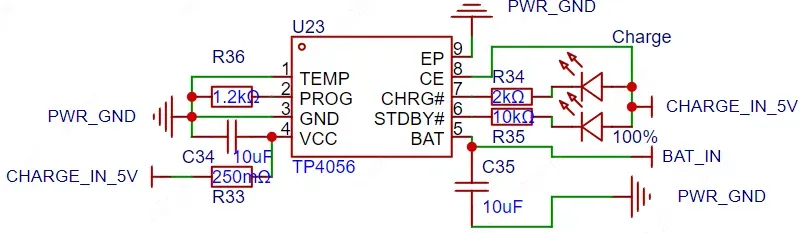
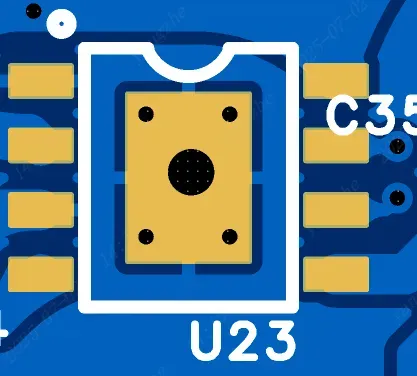
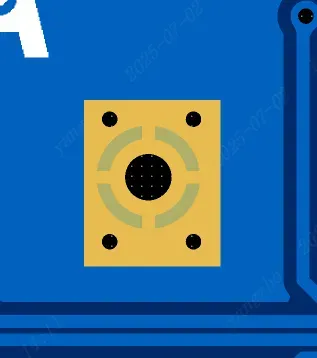
(为方便没有加热台和风枪的用户焊接TP4056,在焊盘背面做了开窗和插件焊盘孔,你可以在孔内插入锡丝并用烙铁融化即可)
| 焊盘正面 | 焊盘背面 |
|---|---|
 |
 |
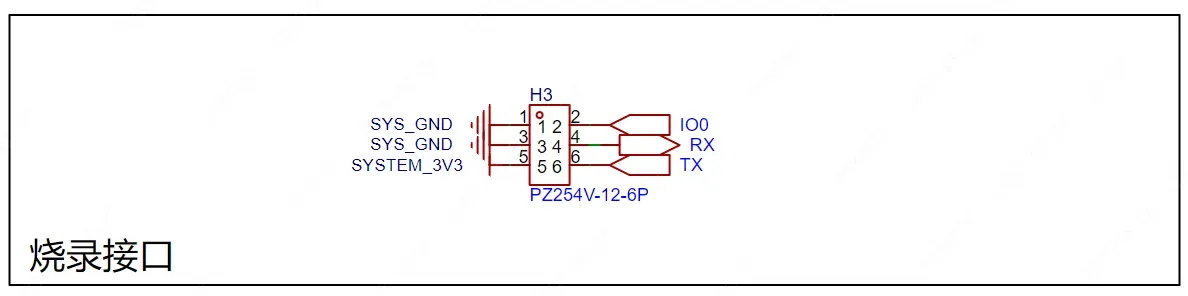
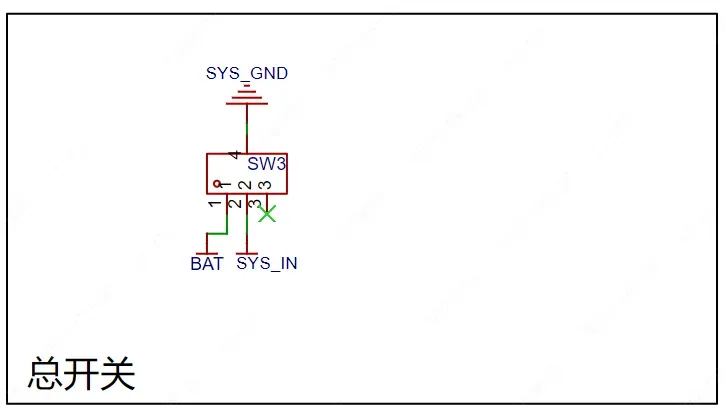
其他外设中有烧录接口、总开关及供电接口。
嵌入式软件开发
- 软件环境:VSCode+PlatformIO
- 开发语言:C/C++
- TFT_eSPI:用于屏幕显示驱动
- ArduinoJson:解析Json数据
- ESPAsyncWebServer-esphome:构建异步WEB服务
Markdown 语法解析会导致部分内容消失,完整源码建议查看附件
#include
#include
#include
#include
#include
#include
#include
#include "image.cpp"
AsyncWebServer server(80);// 设置服务器端口
TFT_eSPI tft = TFT_eSPI();
const char *ssidFile = "/ssid.json"; // 配置存储文件
String ipAddress = "Not Connected";
String lastMode = "";
String lastprimitiveType = "";
String lastIP = "";
String lastname1 = "";
String currentname1 = "--";
String lastdata1 = "";
String currentdata1 = "--";
String lastname2 = "";
String currentname2 = "--";
String lastdata2 = "";
String currentdata2 = "--";
String lastname3 = "";
String currentname3 = "--";
String lastdata3 = "";
String currentdata3 = "--";
String lastname4 = "";
String currentname4 = "--";
String lastdata4 = "";
String currentdata4 = "--";
// AP 默认热点配置
const char *ap_ssid = "EDA-InfoHelper";
const char *ap_password = "";
String currentMode = "--";
String currentprimitiveType = "--";
bool wifiBlink = true;
int temp = 26;
int humi = 45;
// ================== UI 提示函数 ==================
void showMessage(String msg, uint16_t color = TFT_WHITE) {
tft.fillScreen(TFT_BLACK);
tft.setTextColor(color, TFT_BLACK);
tft.drawCentreString(msg, 160, 120, 4);
}
// ================== 原始 UI 元素 ==================
void drawHeader() {
tft.fillRect(0, 0, 320, 20, TFT_NAVY);
tft.setTextColor(TFT_WHITE, TFT_NAVY);
tft.drawString("EDA-InfoHelper", 5, 5, 2);
if (WiFi.status() == WL_CONNECTED) {
tft.setTextColor(TFT_GREEN, TFT_NAVY);
tft.drawRightString(ipAddress, 230, 5, 2);
} else {
tft.setTextColor(TFT_GREEN, TFT_NAVY);
tft.drawRightString(ipAddress, 230, 5, 2);
if (wifiBlink) {
tft.fillRect(290, 5, 5, 14, TFT_CYAN);
tft.fillRect(300, 9, 5, 10, TFT_CYAN);
tft.fillRect(310, 13, 5, 6, TFT_CYAN);
} else {
tft.fillRect(280, 0, 40, 20, TFT_NAVY);
}
}
}
void drawCard(int x, int y,uint16_t color,String mode) {
tft.fillRoundRect(x, y, 80, 80, 8, color);
if(mode == "PCB")
{
/* code */
tft.pushImage(x+3, y+3, 75, 75, pcb);
}
else if(mode == "SCH")
{
/* code */
tft.pushImage(x+3, y+3, 75, 75, sch);
}else{
tft.pushImage(x+3, y+3, 75, 75, eda);
}
}
void drawTextCard(int x, int y, String title, String value, uint16_t color) {
tft.fillRoundRect(x, y, 210, 35, 8, color);
tft.drawRoundRect(x, y, 210, 35, 8, TFT_WHITE);
tft.setTextColor(TFT_WHITE, color);
tft.drawString(title, x + 8, y + 6, 2);
tft.setTextColor(TFT_YELLOW, color);
tft.drawRightString(value, x + 200, y + 5, 4);
}
void drawTextCard2(int x, int y, String title, String value, uint16_t color) {
tft.fillRoundRect(x, y, 145, 50, 8, color);
tft.drawRoundRect(x, y, 145, 50, 8, TFT_WHITE);
tft.setTextColor(TFT_WHITE, color);
tft.drawString(title, x + 8, y + 6, 2);
tft.setTextColor(TFT_YELLOW, color);
tft.drawRightString(value, x + 130, y + 25, 2);
}
// ================== 保存 WiFi 配置 ==================
void saveWiFiConfig(String ssid, String pass) {
DynamicJsonDocument doc(256);
doc["ssid"] = ssid;
doc["pass"] = pass;
fs::File file = SPIFFS.open(ssidFile, "w");
if (file) {
serializeJson(doc, file);
file.close();
}
}
// ================== 加载 WiFi 配置 ==================
bool loadWiFiConfig(String &ssid, String &pass) {
if (!SPIFFS.exists(ssidFile)) return false;
fs::File file = SPIFFS.open(ssidFile, "r");
if (!file) return false;
DynamicJsonDocument doc(256);
if (deserializeJson(doc, file)) return false;
ssid = doc["ssid"].as();
pass = doc["pass"].as();
return true;
}
// ================== WiFi STA 连接函数 ==================
bool connectSTA(String ssid, String pass, int timeout = 10000) {
WiFi.mode(WIFI_STA);
WiFi.begin(ssid.c_str(), pass.c_str());
showMessage("Wait connect WIFI...", TFT_YELLOW);
unsigned long start = millis();
while (WiFi.status() != WL_CONNECTED && millis() - start < timeout) {
delay(3000);
}
if (WiFi.status() == WL_CONNECTED) {
ipAddress = WiFi.localIP().toString();
return true;
} else {
return false;
}
}
// ================== AP 模式启动 ==================
void startAP() {
WiFi.mode(WIFI_AP);
WiFi.softAP(ap_ssid, ap_password);
showMessage("Wait connect WIFI...", TFT_CYAN);
}
// ================== 路由配置 ==================
void handleWiFiConfig() {
server.on("/api", HTTP_POST, [](AsyncWebServerRequest *request) {
if (request->hasParam("mode", true) && request->hasParam("primitiveType", true)) {
currentMode = request->getParam("mode", true)->value();
currentprimitiveType = request->getParam("primitiveType", true)->value();
currentname1 = request->getParam("name1", true)->value();
currentdata1 = request->getParam("data1", true)->value();
currentname2= request->getParam("name2", true)->value();
currentdata2 = request->getParam("data2", true)->value();
currentname3 = request->getParam("name3", true)->value();
currentdata3 = request->getParam("data3", true)->value();
currentname4 = request->getParam("name4", true)->value();
currentdata4 = request->getParam("data4", true)->value();
request->send(200, "application/json", "{\"status\":\"ok\"}");
} else {
request->send(400, "application/json", "{\"error\":\"missing parameters\"}");
}
});
server.on("/connect", HTTP_POST, [](AsyncWebServerRequest *request) {
// 获取POST参数:ssid、pass、city、api
String ssid = request->getParam("ssid", true)->value();
String pass = request->getParam("pass", true)->value();
// 打印接收到的参数
Serial.println(ssid);
Serial.println(pass);
// 保存WiFi信息到JSON文件
DynamicJsonDocument doc(1024);
doc["ssid"] = ssid;
doc["pass"] = pass;
fs::File file = SPIFFS.open(ssidFile, "w"); // 打开文件进行写入
if (file) {
serializeJson(doc, file); // 将JSON内容写入文件
file.close(); // 关闭文件
Serial.println("WiFi信息保存成功,即将重启...");
} else {
Serial.println("无法打开文件保存WiFi信息!");
request->send(500, "application/json", "{\"error\":\"无法保存WiFi信息\"}");
return;
}
// 发送响应告知用户即将重启
request->send(200, "text/html; charset=UTF-8",
""
""
""
" "
" 状态"
""
""
" <h1>WiFi配置已保存,设备正在重启...</h1>"
""
""
);
delay(500); // 确保响应发送出去
ESP.restart(); // 重启设备
});
server.on("/", HTTP_GET, [](AsyncWebServerRequest *request)
{
// 检查SPIFFS文件系统中是否存在index.html文件
if (SPIFFS.exists("/index.html")) {
fs::File file = SPIFFS.open("/index.html", "r"); // 打开index.html文件
if (file) {
size_t fileSize = file.size(); // 获取文件大小
String fileContent;
// 逐字节读取文件内容
while (file.available()) {
fileContent += (char)file.read();
}
file.close(); // 关闭文件
// 返回HTML内容
request->send(200, "text/html", fileContent);
return;
}
}
// 如果文件不存在,返回404错误
request->send(404, "text/plain", "File Not Found"); });
server.on("/setting.html", HTTP_GET, [](AsyncWebServerRequest *request)
{
// 检查SPIFFS文件系统中是否存在index.html文件
if (SPIFFS.exists("/setting.html")) {
fs::File file = SPIFFS.open("/setting.html", "r"); // 打开index.html文件
if (file) {
size_t fileSize = file.size(); // 获取文件大小
String fileContent;
// 逐字节读取文件内容
while (file.available()) {
fileContent += (char)file.read();
}
file.close(); // 关闭文件
// 返回HTML内容
request->send(200, "text/html", fileContent);
return;
}
}
// 如果文件不存在,返回404错误
request->send(404, "text/plain", "File Not Found"); });
// 启动服务器
server.begin();
}
// ================== 主流程 ==================
void setup() {
tft.init();
tft.setRotation(1);
tft.fillScreen(TFT_BLACK);
Serial.begin(115200);
SPIFFS.begin();
String ssid, pass;
if (loadWiFiConfig(ssid, pass)) {
if (!connectSTA(ssid, pass)) {
startAP();
}
} else {
startAP();
}
handleWiFiConfig();
if (WiFi.status() == WL_CONNECTED) {
tft.fillScreen(TFT_BLACK);
drawHeader();
drawCard(10, 30, TFT_WHITE,"EDA");
drawTextCard(100, 30, "mode", "JLC_EDA", TFT_GREEN);
drawTextCard(100, 75, "primitiveType", "ABC", TFT_SKYBLUE);
drawTextCard2(10, 120, "name1", "data1", TFT_ORANGE);
drawTextCard2(165, 120, "name2", "data2", TFT_ORANGE);
drawTextCard2(10, 180, "name3", "data3", TFT_MAGENTA);
drawTextCard2(165, 180, "name4", "data4", TFT_MAGENTA);
}
}
void loop() {
// WiFi 状态刷新(顶部 header)
static unsigned long lastBlink = 0;
if (millis() - lastBlink > 500) {
wifiBlink = !wifiBlink;
String currentIP = WiFi.localIP().toString();
// 仅当IP发生变化或wifiBlink状态改变时才刷新header
if (currentIP != lastIP) {
ipAddress = currentIP;
drawHeader();
lastIP = currentIP;
} else if (wifiBlink) {
drawHeader(); // 保持闪烁动画
}
lastBlink = millis();
}
// 实时更新 mode/data(仅当发生变化时)
if (WiFi.status() == WL_CONNECTED) {
if (currentMode != lastMode) {
drawTextCard(100, 30, "mode", currentMode, TFT_GREEN);
drawCard(10, 30, TFT_WHITE,currentMode);
lastMode = currentMode;
}
if (currentprimitiveType != lastprimitiveType) {
drawTextCard(100, 75, "primitiveType", currentprimitiveType, TFT_SKYBLUE);
lastprimitiveType = currentprimitiveType;
}
if (currentdata1 != lastdata1) {
if (currentdata1.length() > 16) {
currentdata1 = currentdata1.substring(0, 16);
}
drawTextCard2(10, 120, currentname1, currentdata1, TFT_ORANGE);
lastname1 = currentname1;
lastdata1 = currentdata1;
}
if (currentdata2 != lastdata2) {
if (currentdata2.length() > 16) {
currentdata2 = currentdata2.substring(0, 16);
}
drawTextCard2(165, 120,currentname2,currentdata2, TFT_ORANGE);
lastname2 = currentname2;
lastdata2 = currentdata2;
}
if (currentdata3 != lastdata3) {
if (currentdata3.length() > 16) {
currentdata3 = currentdata3.substring(0, 16);
}
drawTextCard2(10, 180, currentname3, currentdata3, TFT_MAGENTA);
lastname3 = currentname3;
lastdata3 = currentdata3;
}
if (currentdata4 != lastdata4) {
if (currentdata4.length() > 16) {
currentdata4 = currentdata4.substring(0, 16);
}
drawTextCard2(165, 180, currentname4, currentdata4, TFT_MAGENTA);
lastname4 = currentname4;
lastdata4 = currentdata4;
}
}
}
上位机客户端软件开发
- 软件环境:VSCode
- 开发语言:Python
- Flask:用来快速搭建 HTTP 接口或 Web 应用
- requests:用来发送 GET/POST 等请求
- flask_cors (CORS):用来处理跨域请求问题
- Pillow (PIL):托盘图标绘制
- pystray:用于在系统托盘创建图标和菜单
import threading
from flask import Flask, request, jsonify
import requests
from flask_cors import CORS
from PIL import Image, ImageDraw
import pystray
import sys
import tkinter as tk
from tkinter import messagebox
app = Flask(__name__)
CORS(app)
# --- Flask 路由 ---
@app.route("/proxy/api", methods=["POST"])
def proxy_api():
    try:
        ip = request.form.get('ip', '127.0.0.1')
        mode = request.form.get('mode')
        primitiveType = request.form.get('primitiveType')
        name1 = request.form.get('name1')
        data1 = request.form.get('data1')
        name2 = request.form.get('name2')
        data2 = request.form.get('data2')
        name3 = request.form.get('name3')
        data3 = request.form.get('data3')
        name4 = request.form.get('name4')
        data4 = request.form.get('data4')
        if not all([ip, mode, primitiveType,name1,data1,name2,data2,name3,data3,name4,data4]):
            return {"success": False, "error": "缺少必要参数"}, 400
        target_url = f"http://{ip}/api"
        resp = requests.post(target_url,
                             data={"mode": mode, "primitiveType": primitiveType,
                                   "name1":name1,"data1":data1,
                                   "name2":name2,"data2":data2,
                                   "name3":name3,"data3":data3,
                                   "name4":name4,"data4":data4},
                             headers={"Content-Type": "application/x-www-form-urlencoded"},
                             timeout=5)
        resp.raise_for_status()
        return {"success": True, "esp_response": resp.text}
    except Exception as e:
        return {"success": False, "error": str(e)}, 500
# --- 托盘相关 ---
def create_image():
    img = Image.new('RGB', (64, 64), color='white')
    d = ImageDraw.Draw(img)
    d.rectangle([16, 16, 48, 48], fill='black')
    return img
def on_quit(icon, item):
    icon.stop()
    sys.exit(0)
def run_tray():
    icon = pystray.Icon("EDA-InfoHelper")
    icon.icon = create_image()
    icon.title = "EDA-InfoHelper"
    icon.menu = pystray.Menu(pystray.MenuItem("EDA-InfoHelper正在运行",None),pystray.MenuItem("退出", on_quit))
    icon.run()
# --- 弹窗提示 ---
def show_startup_message():
    root = tk.Tk()
    root.withdraw()  # 隐藏主窗口
    messagebox.showinfo("提示", "EDA-InfoHelper 已启动并隐藏到托盘")
    root.destroy()
# --- 启动 Flask 线程 ---
def run_flask():
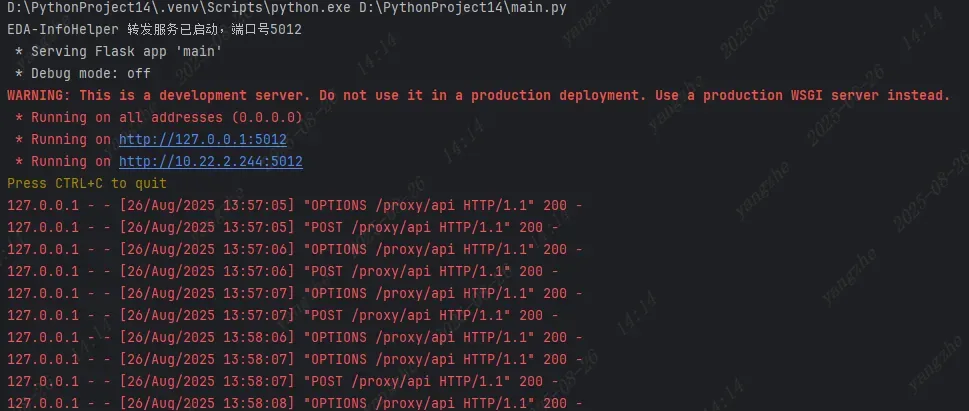
    print("EDA-InfoHelper 转发服务已启动,端口号5012")
    app.run(host="0.0.0.0", port=5012, debug=False)
if __name__ == "__main__":
    # 弹窗提示
    show_startup_message()
    # 启动 Flask 后台线程
    threading.Thread(target=run_flask, daemon=True).start()
    # 显示托盘图标
    run_tray()
嘉立创EDA插件开发
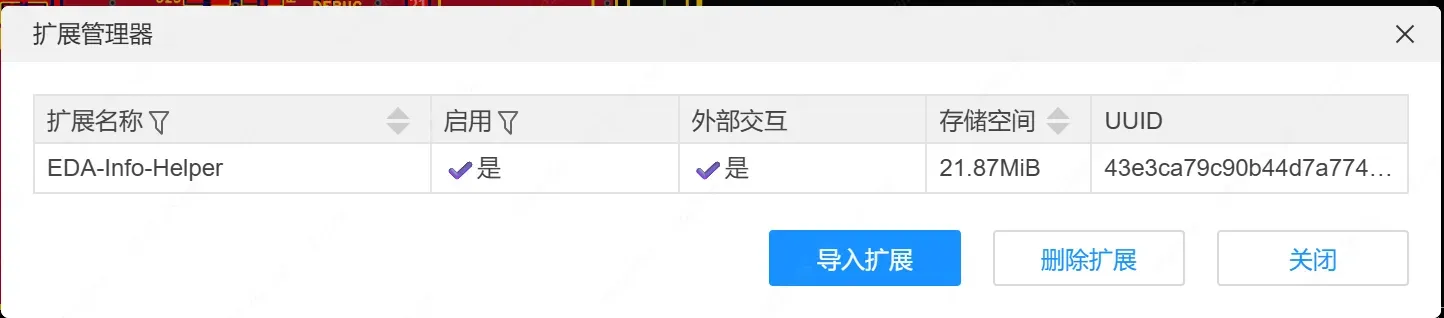
- 软件环境:VSCode
- 开发语言:Html/CSS/TypeScript
import * as extensionConfig from '../extension.json';
import * as func from './function';

// eslint-disable-next-line @typescript-eslint/no-unused-vars
export function activate(status?: 'onStartupFinished', arg?: string): void {}

export function about(): void {
	eda.sys_Dialog.showInformationMessage(
		eda.sys_I18n.text('EasyEDA extension SDK v', undefined, undefined, extensionConfig.version),
		eda.sys_I18n.text('About'),
	);
}
let timerId: ReturnType | null = null;
// 封装定时器函数

// 启动定时器
export async function start(): Promise {
	const configs = await eda.sys_Storage.getExtensionAllUserConfigs();

	if (configs.timerId) {
		console.log('定时器已存在:', configs.timerId);
		return;
	}

	const id = func.createDocumentTimer();

	// 保存到扩展配置
	await eda.sys_Storage.setExtensionAllUserConfigs({
		...configs,
		timerId: id,
	});

	console.log('start timerId =', id);
}

// 停止定时器
export async function stopa(): Promise {
	console.log('stop');
	const configs = eda.sys_Storage.getExtensionAllUserConfigs();
	const id = configs.timerId;

	console.log('stop timerId =', id);
	if (id !== undefined) {
		clearInterval(id);
		delete configs.timerId;
		await eda.sys_Storage.setExtensionAllUserConfigs(configs);
		console.log('循环已停止');
	}
}
export async function setting(): Promise {
	eda.sys_IFrame.openIFrame('/iframe/index.html', 450, 500);
}
export function createDocumentTimer(): number {
	return setInterval(() => {
		eda.dmt_SelectControl
			.getCurrentDocumentInfo()
			.then(async (doc) => {
				if (doc) {
					console.log('用户当前在:' + doc.documentType);
					if (doc.documentType === 3) {
						// PCB
						const items = await eda.pcb_SelectControl.getSelectedPrimitives();
						if (items && items.length > 0) {
							items.forEach((i) => {
								const dataValue = i.pcbItemPrimitiveType ?? 0; // 如果 undefined 就用 0
								switch (dataValue) {
									case "Component":
										const name = i.device.name?? 0;
										const part = i.device.attrs["Supplier Part"]?? 0;
										const footprint = i.attrsMap["Footprint"] ?? 0;
										const globalIndex = i.globalIndex ?? 0;
										sendData("PCB", dataValue,"name",name,"part",part,"footprint",footprint,"globalIndex",globalIndex);
										break;
									case "Pad":
										const net = i.net ?? 0;
										const num = i.num ?? 0;
										const layerId = i.layerId ?? 0;
										const globalIndex2 = i.globalIndex ?? 0;
										sendData("PCB", dataValue,"net",net,"num",num,"layerId",layerId,"globalIndex",globalIndex2);
										break;
									case "Text":
										const formulaName = i.formulaName ?? 0;
										const fontSize = i.fontSize ?? 0;
										const key = i.key ?? 0;
										const globalIndex3 = i.globalIndex ?? 0;
										sendData("PCB", dataValue,"formulaName", formulaName,"fontSize",fontSize,"key",key,"globalIndex",globalIndex3);
										break;
									case "Rect":
										const height = i.height ?? 0;
										const width = i.width ?? 0;
										const type = i.type ?? 0;
										const globalIndex4 = i.globalIndex ?? 0;
										sendData("PCB", dataValue,"height",height,"width",width,"type",type,"globalIndex",globalIndex4);
										break;
									case "Via":
										const net2 = i.net ?? 0;
										const holeRadius = i.holeRadius ?? 0;
										const radius = i.radius ?? 0;
										const globalIndex5 = i.globalIndex ?? 0;
										sendData("PCB", dataValue,"net",net2,"holeRadius",holeRadius,"radius",radius,"globalIndex",globalIndex5);
										break;
									case "Polygon":
										const strokeWidth = i.strokeWidth ?? 0;
										const type2 = i.type ?? 0;
										const layerId2 = i.layerId ?? 0;
										const globalIndex6 = i.globalIndex ?? 0;
										sendData("PCB", dataValue,"strokeWidth",strokeWidth,"type",type2,"layerId",layerId2,"globalIndex",globalIndex6);
										break;
									default:
										break;
								}

							});
						}
					} else if (doc.documentType === 1) {
						// SCH
						const items = await eda.sch_SelectControl.getSelectedPrimitives();
						if (items && items.length > 0) {
							items.forEach((i) => {
								const dataValue = i.primitiveType ?? 0; // 防止 undefined
								switch (dataValue) {
									case "Component":

										const designator = i.param.designator?? 0;
										const uniqueId = i.param.uniqueIdt?? 0;
										const id = i.id ?? 0;
										sendData("SCH", dataValue,"designator",designator,"uniqueId",uniqueId,"id",id,"---","---");
										break;
									case "Net Port":
									case "Wire":
									case "Net Flag":
										const net = i.param.net ?? 0;
										const id2 = i.id ?? 0;
										sendData("SCH", dataValue,"net",net,"id",id2,"---","---","---","---");
										break;
									case "Property":
									case "Text":
										const id3 = i.id ?? 0;
										sendData("SCH", dataValue,"id",id3,"---","---","---","---","---","---");
										break;
									case "Name":

										const id4 = i.id ?? 0;
										sendData("SCH", dataValue,"id",id4,"---","---","---","---","---","---");
										break;

									default:
										break;
								}
							});
						}
					}
				} else {
					console.log('当前没有选中文档');
				}
			})
			.catch((err) => {
				console.error('获取文档信息失败:', err);
			});
	}, 1000);
}
function sendData(mode: String, primitiveType: String,name1:String,data1:String,name2:String,data2:String,name3:String,data3:String,name4:String,data4:String) {
	const params = new URLSearchParams();

	// 获取已存储的IP地址
	const configs = eda.sys_Storage.getExtensionAllUserConfigs();
	const ip = configs.ip || '127.0.0.1';
	params.append('ip', ip); // 新增IP参数
	params.append('mode', mode.toString());
	params.append('primitiveType', primitiveType.toString());
	params.append('name1', name1.toString());
	params.append('data1', data1.toString());
	params.append('name2', name2.toString());
	params.append('data2', data2.toString());
	params.append('name3', name3.toString());
	params.append('data3', data3.toString());
	params.append('name4', name4.toString());
	params.append('data4', data4.toString());
	eda.sys_ClientUrl
		.request(
			'http://127.0.0.1:5012/proxy/api',
			'POST',
			params.toString(),
			{
				headers: { 'Content-Type': 'application/x-www-form-urlencoded' },
			},
			(res) => {
				console.log('数据发送成功', res);
			},
		)
		.catch((err) => {
			console.error('请求失败:', err);
		});
}

declare global {
	interface ExtensionConfigs {
		timerId?: number;
		ip?: string; // 新增IP字段
	}
}
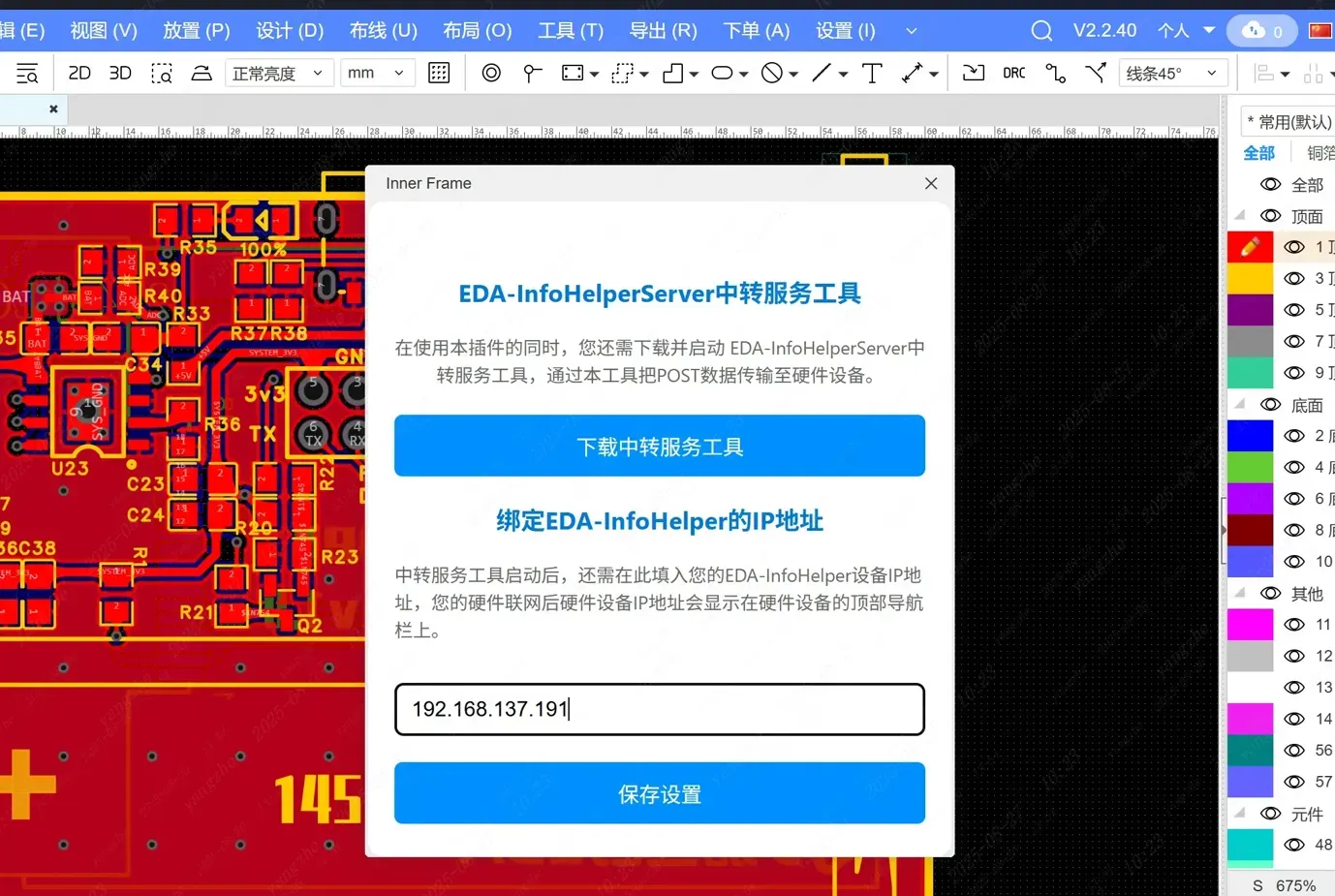
<div>

	<div>
		<h3>EDA-InfoHelperServer中转服务工具</h3>
		<p>在使用本插件的同时,您还需下载并启动 EDA-InfoHelperServer中转服务工具,通过本工具把POST数据传输至硬件设备。</p>
		下载中转服务工具
	</div>
	<div>
		<h3>绑定EDA-InfoHelper的IP地址</h3>
		<p>中转服务工具启动后,还需在此填入您的EDA-InfoHelper设备IP地址,您的硬件联网后硬件设备IP地址会显示在硬件设备的顶部导航栏上。</p>
		<input type="text" id="ipAddress" />
		保存设置
	</div>
</div>
Markdown 语法解析会导致部分内容消失,详细内容建议看附件文件
3D外壳结构
| 正面 | 背面 |
|---|---|
 |
 |
- 内壁设置有限位槽,为按键预留空间。
- 屏幕部分设有隔离层,避免屏幕接触PCB焊盘导致短路
- 按键及TypeC开槽
| 正面 | 背面 |
|---|---|
 |
 |
- 后盖部分采用异形结构
- 同样圆角处理
- 为烧录接口开槽
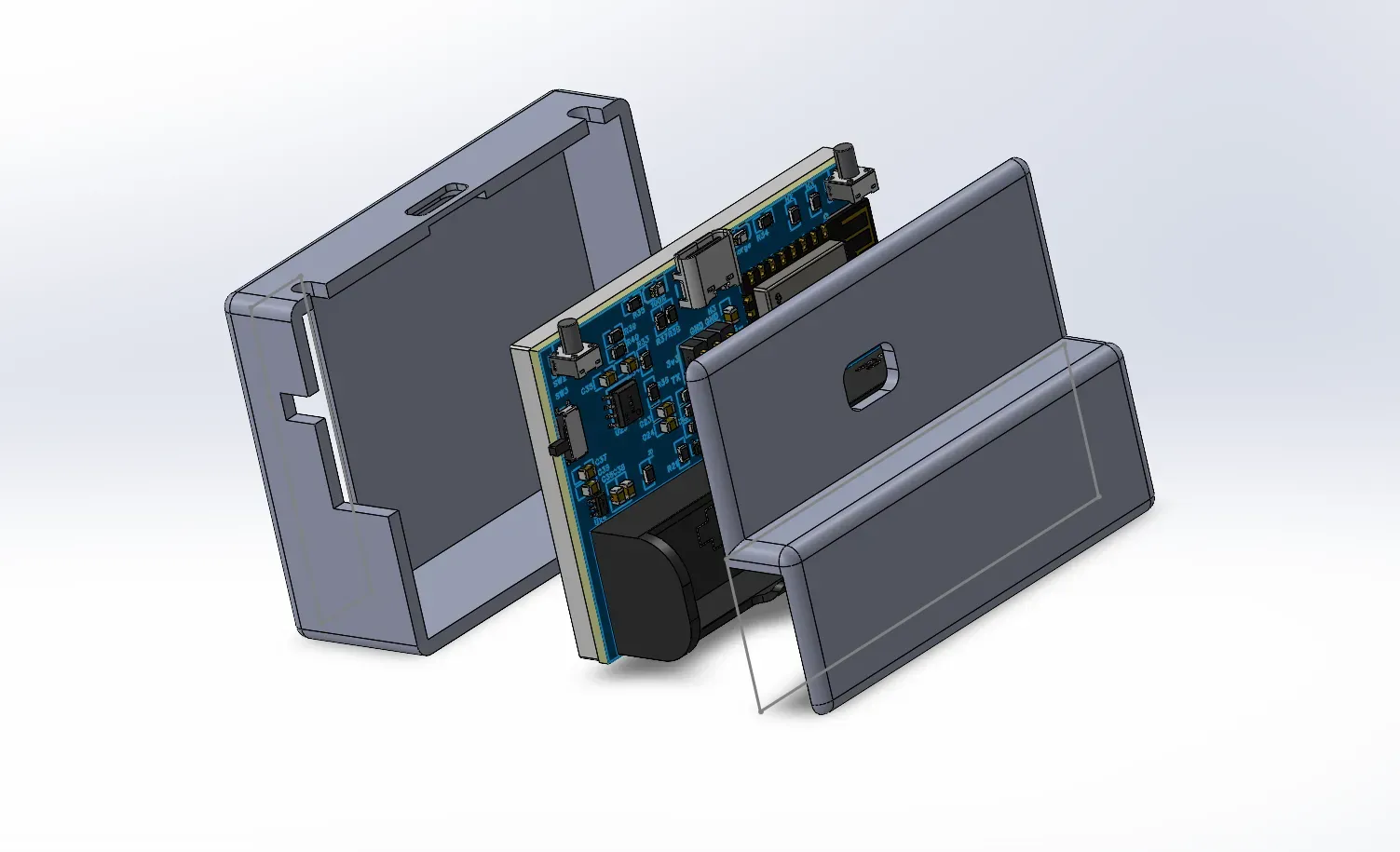
安装结构
项目采用的是双外壳结构,由前盖、后盖构成
| EDA插件配置IP | 点击器件 |
|---|---|
 |
 |
| EDA发送数据 | 中转服务接收及转发 |
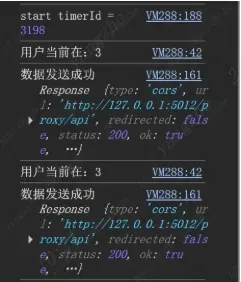 |
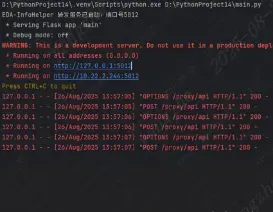 |
| 硬件接收PCB数据显示 | 硬件接收原理图数据显示 |
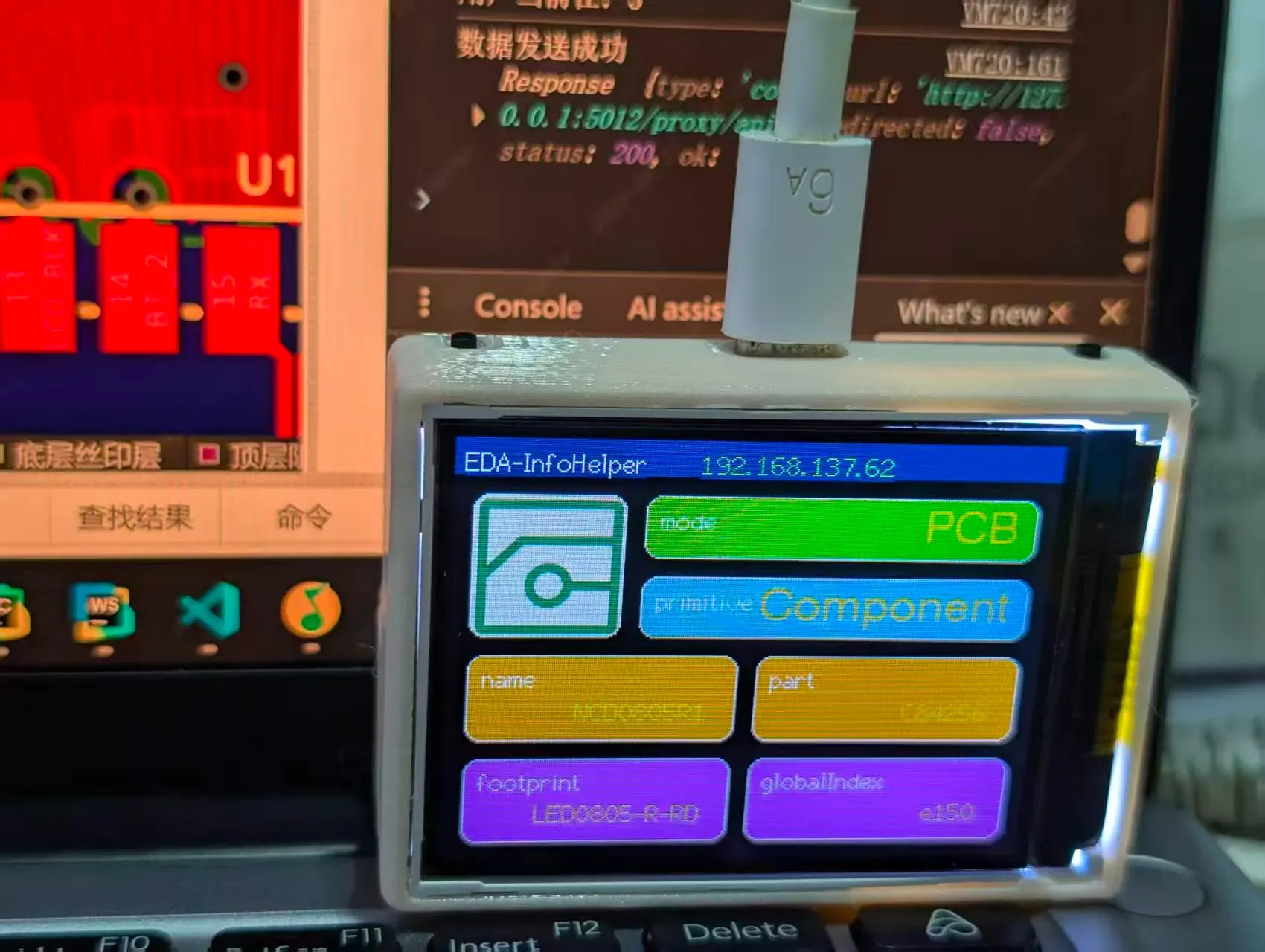 |
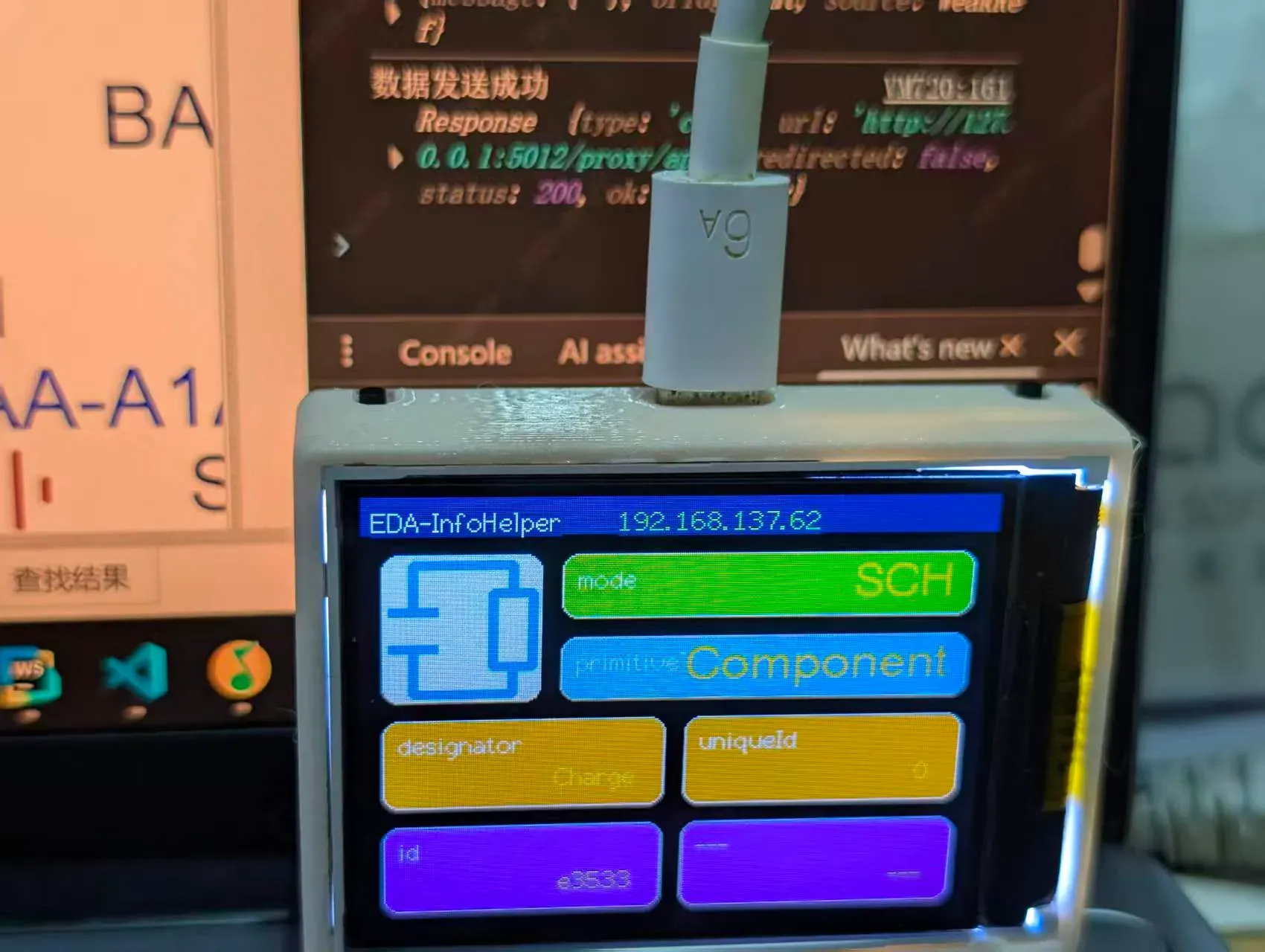 |
| PCB数据显示总流程 | 原理图数据显示总流程 |
 |
 |
- 一键DRC报告
- 在EDA中显示硬件信息
- 天气、时钟显示
- ......
附件"EDA-InfoHelper资源包"包含所有编译后产物、3D文件及硬件工程,源码文件则单独打包在附件中
硬件烧录请参考: EDA-Robot机器狗 烧录说明 插件安装请参考: 嘉立创EDA扩展广场_EDA-InfoHelper扩展插件
1.为硬件上电并连接“EDA-InfoHelp” 2.4G热点。
2.连接成功后进入192.168.4.1完成配网(配置2.4G频段网络)
3.设备联网后会在顶部状态栏显示IP地址,记录下这个IP
4.在EDA-设置-扩展-扩展管理器导入eda-info-helper.eext插件,并允许外部交互。
5.进入PCB或原理图页面,点击顶部状态栏InfoHelper-设置页面
6.填入记录的IP地址并下载中转服务工具。
7.打开中转服务工具即可
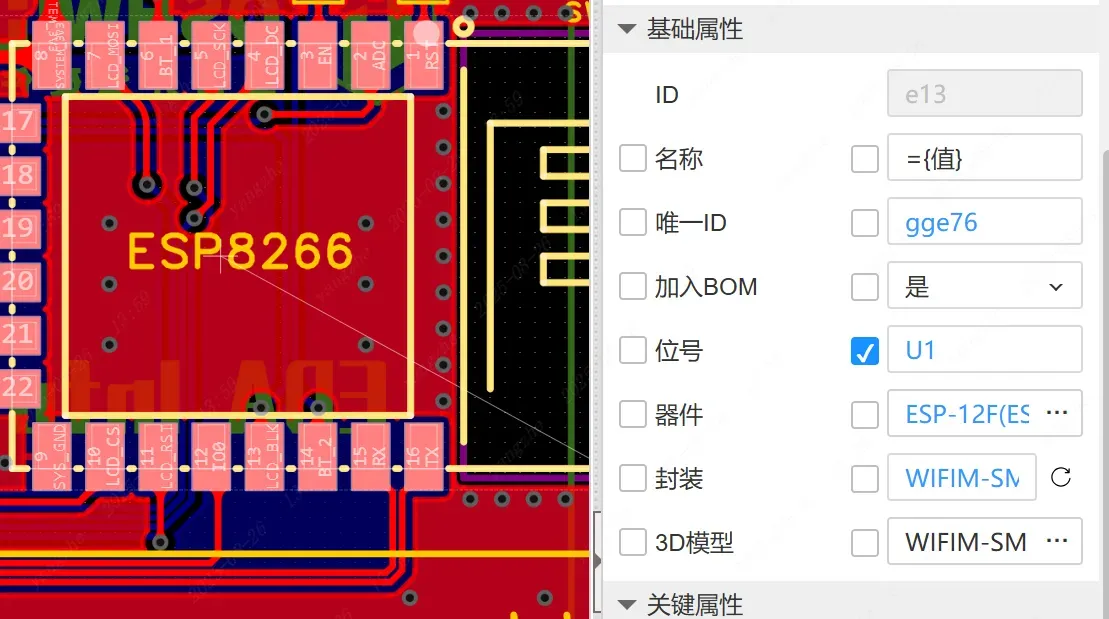
现在,点击任意器件即可显示信息了。